
 Deutsch




Automatic Google Fonts Embedder

Automatically Embed Google Fonts Locally in WordPress
With the WordPress plugin „Automatic Google Fonts Embedder“ You can automatically detect the Google Fonts used on your website, download them, and integrate them locally on your own web server.
The plugin scans your WordPress website for embedded Google Fonts, saves the necessary font files locally, and replaces the external links to Google's servers. As a result, the corresponding fonts no longer need to be loaded from external Google servers when your website is accessed.
Here's how you can Hosting Google Fonts Locally in WordPress, without having to manually download font files, convert them, or incorporate them using custom CSS adjustments.
Embedding Google Fonts from an external source may result in technical data—such as the visitor's IP address—being transmitted to Google when a website is accessed. The Automatic Google Fonts Embedder helps you avoid such external connections and your Optimizing a WordPress website for compliance with the GDPR.
Automatic Google Fonts Embedder 2.0
Version 2.0 was completely redeveloped from the ground up. This comprehensive rewrite provides a modern, high-performance, and reliable foundation for current and future versions of WordPress, PHP, themes, and plugins.
The Automatic Google Fonts Embedder 2.0 is compatible with the latest versions of WordPress, including WordPress 7 and has been optimized for modern PHP 8 environments.
This new development specifically improves the detection, processing, and local delivery of the Google Fonts used. At the same time, the plugin's technical foundation has been modernized to enable reliable further development and adaptation to future versions of WordPress, WooCommerce, themes, plugins, and page builders.
This means you won't be getting an outdated helper plugin, but rather a solution that is actively maintained and was developed specifically for modern WordPress and WooCommerce websites.
Support for WordPress, WooCommerce, themes, and page builders
On a technical level, the Automatic Google Fonts Embedder works with WordPress's standardized interfaces. As a result, the plugin is compatible with a wide range of WordPress and WooCommerce themes, plugins, and popular page builders.

An Overview of the Most Important Features
- Automatically Embed Google Fonts Locally in WordPress
- Automated detection of Google Fonts used on the website
- Download and save the required font files to your own web server
- No manual editing of font or CSS files is required
- Support for WordPress and WooCommerce Themes
- Compatibility with popular WordPress plugins and page builders
- Detecting Stylesheets Registered via WordPress
- Detecting Google Fonts Loaded via WebFontLoader
- Detection of Google Fonts Embedded Directly in the HTML Code or the Customizer
- Easy operation and built-in error detection
- Content blockers for external third-party content
- Comprehensive German-language help documentation and support
- Compatibility with current versions of WordPress, including WordPress 7
- A high-performance and reliable technical foundation thanks to a complete rewrite
Here's how to integrate Google Fonts locally
After installation, the plugin analyzes the stylesheets and font sources embedded in your WordPress website. Detected Google Fonts are automatically downloaded, stored locally on your web server, and then served from there.
Among other things, the plugin works with the official WP_Dependencies-system in WordPress and scans the stylesheets registered there for references to Google Fonts.
The Features wp_register_style() and wp_enqueue_style() provide the standardized way to embed CSS files—and thus Google Fonts—in WordPress. Since most professionally developed themes, plugins, and page builders use these WordPress interfaces, the Automatic Google Fonts Embedder is compatible with a wide range of different WordPress systems.
Version 2.0 also recognizes Google Fonts that are integrated using other commonly used methods. These include, in particular, fonts that are loaded via WebFontLoader or embedded directly into the HTML code of a theme, plugin, or the WordPress Customizer.
As a result, the plugin covers various possible sources for Google Fonts and can automatically download the fonts it finds and embed them locally.
Complex configuration or manual editing of your theme files is generally not necessary. After scanning and processing, the plugin handles the local deployment of the detected Google Fonts in the background.
Who is the Automatic Google Fonts Embedder designed for?
Among other things, the plugin is suitable for:
- Businesses and self-employed individuals with a WordPress website
- Operators of WooCommerce online stores
- Web Designers and WordPress Agencies
- Blogs, company websites, and online portals
- Websites Built with Popular WordPress Page Builders
- Website operators who want to host Google Fonts locally without making manual CSS adjustments
- Administrators who manage multiple WordPress sites
- Websites that incorporate Google Fonts through themes or plugins
The Automatic Google Fonts Embedder can be used on both newly created WordPress websites and existing installations.
Identifying Google Fonts from Different Sources
Google Fonts can be integrated into many different parts of a WordPress website. Often, the fonts do not come directly from the theme being used, but are loaded via plugins, page builders, widgets, forms, or custom settings.
The Automatic Google Fonts Embedder therefore supports various technical embedding methods:
- about
wp_register_style()registered stylesheets - about
wp_enqueue_style()embedded stylesheets - Google Fonts loaded via WebFontLoader
- Google Fonts references embedded directly in the HTML code
- Fonts integrated via the theme or the WordPress Customizer
- Google Fonts from compatible plugins and page builders
This comprehensive detection reduces manual effort and makes it easier to integrate the Google Fonts used locally, especially on more complex WordPress and WooCommerce websites.
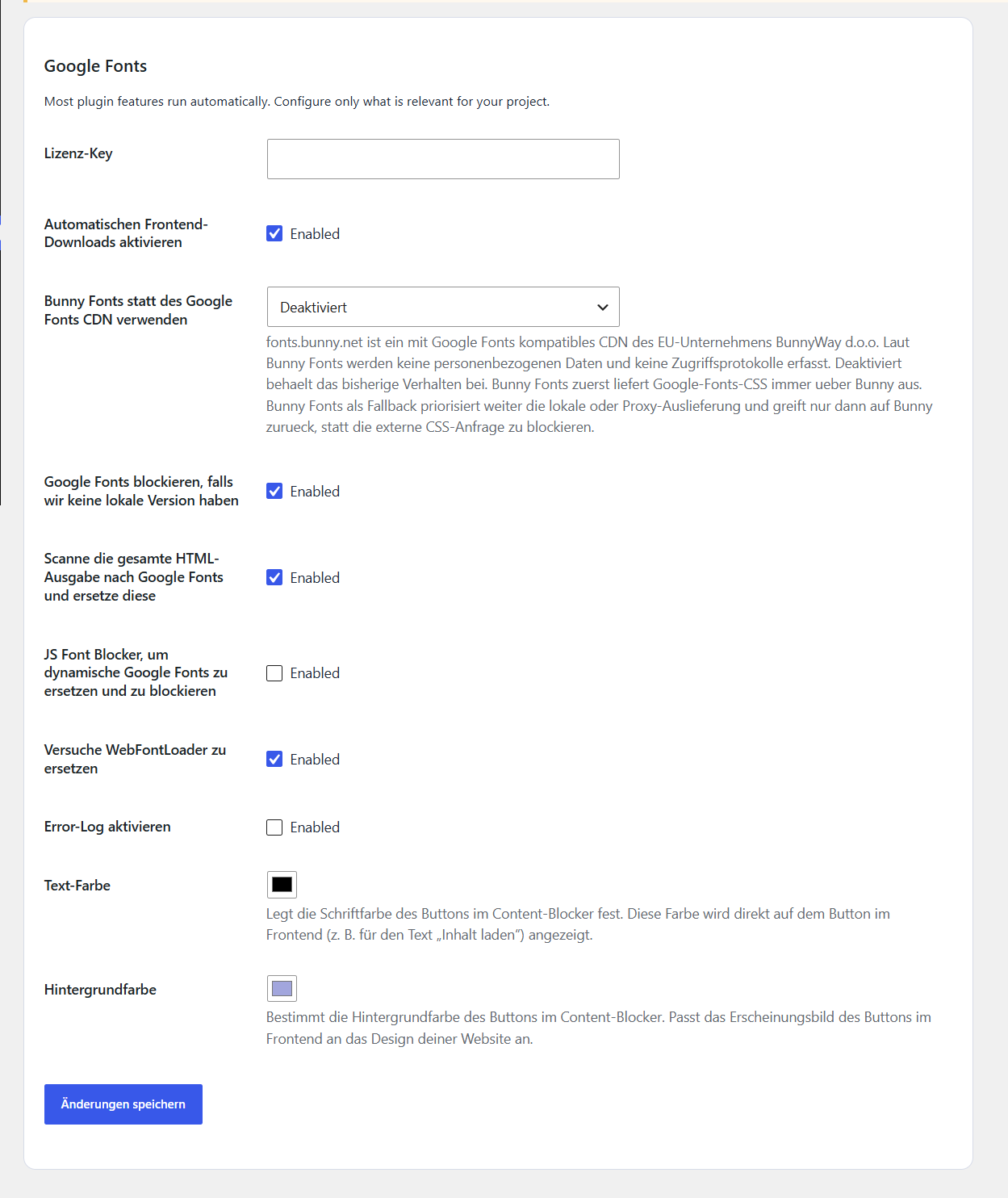
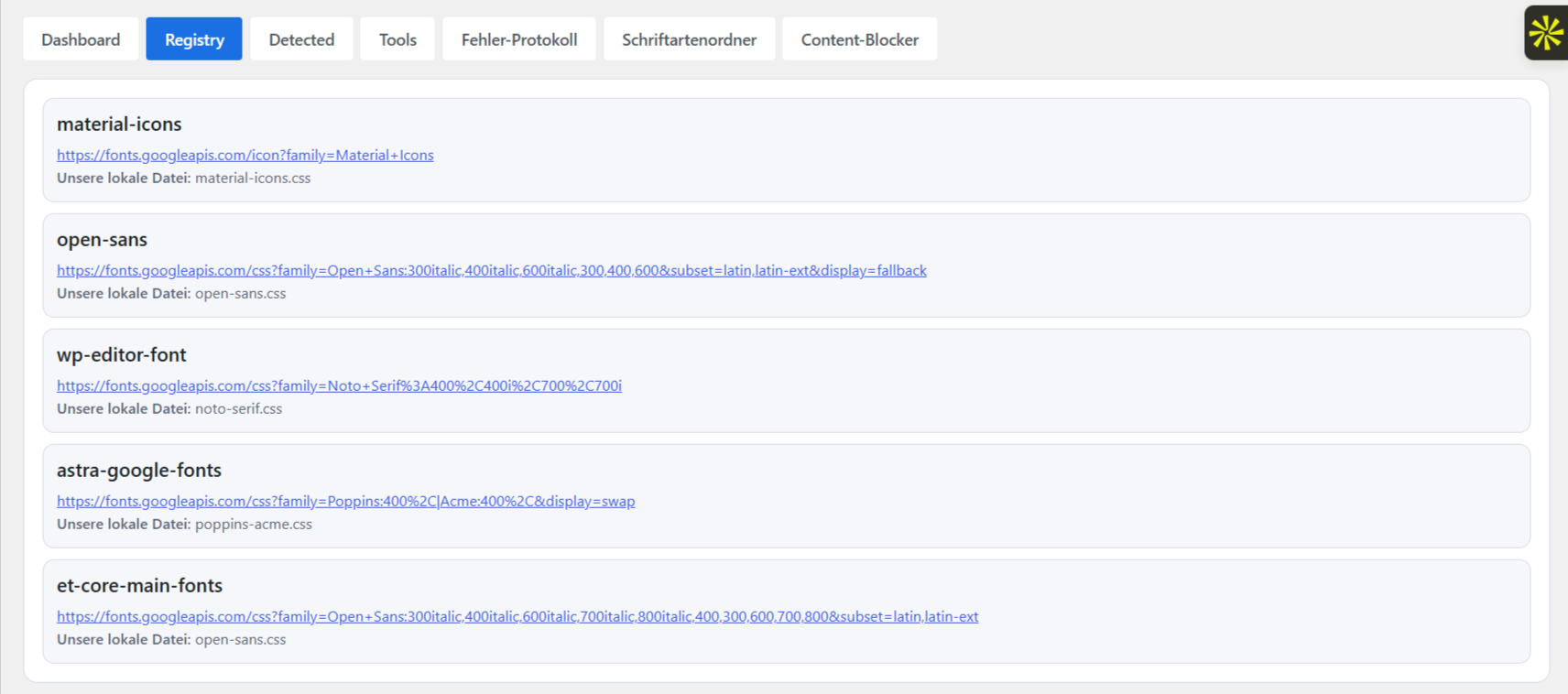
Plugin Interface and Settings
Software Requirements
- WordPress 6.0 or later
- Compatible with WordPress 7
- PHP 8.0 or later
- A fully functional WordPress Cron and HTTP API
- Sufficient write permissions for local storage of font files
To ensure the most reliable detection possible, themes and plugins should use the standardized WordPress interfaces for registering and integrating stylesheets. Version 2.0 can also detect various Google Fonts integrated via the WebFontLoader or directly in the HTML code.
Depending on the number of Google Fonts and font styles used on your website, the requirements for the PHP settings may max_execution_time and memory_limit vary.
More fonts and font styles require correspondingly more resources for downloading and processing. We recommend a max_execution_time of at least 60 seconds, as well as a memory_limit at least 128 MB.
Frequently Asked Questions About WordPress, Google Fonts, and the GDPR
Why should Google Fonts be embedded locally in WordPress?
With external embedding, the font files are loaded from Google's servers when the website is accessed. In this process, technical data such as the visitor's IP address may be transmitted to Google. With local storage, the font files are instead served directly from your own web server.
Does the plugin automatically detect Google Fonts?
Yes. The Automatic Google Fonts Embedder analyzes various technical sources and automatically detects most of the Google Fonts embedded on a WordPress website.
These include, among other things, stylesheets registered via WordPress, inclusions via WebFontLoader, and various Google Fonts references embedded directly in the HTML code.
Do Google Fonts have to be downloaded manually?
No. The plugin automatically downloads the detected font files and saves them to your own web server. Manual editing, conversion, or integration of the font files is generally not required.
Does the plugin work with WooCommerce?
Yes. The Automatic Google Fonts Embedder can also be used on WooCommerce websites. It depends on how the theme you're using, the installed plugins, and the page builder in question technically integrate Google Fonts.
Does the plugin work with page builders?
The plugin is compatible with a wide range of popular WordPress page builders. In particular, it recognizes Google Fonts that are loaded via the standard WordPress interfaces, via WebFontLoader, or via supported HTML inclusions.
Does the plugin support WordPress 7?
Yes. Version 2.0 is compatible with WordPress 7. The minimum requirement is WordPress 6.0.
Can the plugin also detect hard-coded Google Fonts?
In addition to stylesheets registered through WordPress, Version 2.0 also recognizes various Google Fonts references that have been written directly into the HTML code of a theme, plugin, or the Customizer.
Since WordPress websites can vary greatly in their technical structure, it is still necessary to check independently after processing to ensure that all fonts have been recognized and embedded locally.
Does the plugin automatically make my website fully GDPR-compliant?
The plugin helps you integrate Google Fonts locally and implement other technical data protection measures. However, whether a website as a whole meets all data protection requirements depends on all of the themes, plugins, scripts, cookies, forms, and external services it uses.
Therefore, the plugin is not a substitute for a comprehensive privacy audit or individual legal advice.
How can I check if external Google Fonts are still being loaded?
After installation and configuration, you should check on your own to ensure that all Google Fonts are embedded locally and that there are no longer any connections to external Google Fonts servers.
For this purpose, the following testing services from independent third-party providers, for example, can be used:
The services listed are operated by independent third-party providers. This list is provided solely as a reference to potential testing options and does not constitute an explicit recommendation or guarantee regarding their availability, scope of functionality, or test results.
License Information, Updates, and Support
Depending on the license you choose, the plugin may be used on a varying number of WordPress installations. We define a WordPress website as a single WordPress installation under a single domain.
For example, if you use a WordPress multisite, the number of individual websites or subsites counts, provided they are accessible via their own domains.
Each license includes the following for a period of one year from the date of purchase:
- Access to feature, security, and compatibility updates
- Updates to supported versions of WordPress, PHP, themes, and plugins
- Support via email or through our ticket system
- Access to the latest version of the plugin
If you would like to continue receiving updates and support after this period expires, you must manually renew the license.
This is not a subscription. The license does not renew automatically.
You can continue to use the most recently downloaded plugin version indefinitely, even after the license period has expired. However, without an active license, you will not receive any further security updates, feature updates, or compatibility updates for future versions of WordPress, PHP, themes, and plugins.
Free Website Checks at Bajorat Media | Cockpit
In addition to the plugin, you can analyze many other areas of your WordPress website for free using Bajorat Media | Cockpit.
The Cockpit brings together more than 50 tools for website owners, businesses, freelancers, and agencies. These include, among others:
- General website checks with clear and prioritized recommendations
- GDPR and Cookie Scans
- On-Page SEO Analyses
- Visibility Tests on Google and in AI Systems
- Performance, PageSpeed, and Core Web Vitals Analyses
- Security Checks for WordPress Websites
- Checks of robots.txt, sitemap, and llms.txt
- More free tools for SEO, GEO, web development, and data protection
Free access to Bajorat Media | Cockpit can be used indefinitely.
Bajorat Media | Discover Cockpit and free website tools
Note for Existing Customers Upgrading to Version 2.0
Version 2.0 is based on a complete technical rewrite and is not a typical feature update to the previous version of the plugin. Furthermore, since the minimum requirements for WordPress and PHP have increased, Version 2.0 will not be automatically installed on existing installations of Version 1.x.
If you are already using an earlier version of the plugin, you can continue to use it. There is no immediate need to upgrade, provided that the current version works reliably in your system environment.
Customers with an active license can download Version 2.0 from their customer account in the Bajorat Media Store and then install it manually:
Download Version 2.0 from your customer account
Before making the switch, check to see if your website meets the current software requirements. We also recommend creating a full backup and, if possible, testing the new version in a staging or test environment first.
Liability
1. general
We, as well as our legal representatives and agents, are liable only for willful misconduct and gross negligence and, to the extent that material contractual obligations are affected—that is, obligations whose fulfillment is of particular importance for achieving the purpose of the contract—also for slight negligence. In this regard, liability for gross and slight negligence is limited to foreseeable damages typical for this type of contract.
2. disclaimer
Please be sure to note the software requirements listed in this product description for using our plugin, as well as the period during which you will receive security, feature, and compatibility updates for the plugin.
After the plugin has been installed and configured, you must verify on your own that Google Fonts are fully integrated locally and that there are no unwanted connections to external Google Fonts servers.
For this purpose, the following testing services from independent third-party providers, for example, can be used:
The testing services listed are operated by independent third-party providers. This list is provided solely as a reference to potential testing options and does not constitute an explicit recommendation. We have no control over the availability, functionality, completeness, or accuracy of the test results provided by these services.
We are liable only for damages for which we are responsible or that fall within our area of responsibility. This does not apply, for example, to cases in which you have failed to update your system or the plugins it contains, resulting in incompatibilities with our plugin; in which non-WordPress components interfere with the plugin’s functionality; or in which the specified software requirements are not met.
After installing or activating any additional plugins or themes, please check to see if this causes Google Fonts or other external resources to be loaded again.
After every update to your WordPress system, check to see if the plugin is still working properly. You must also manually verify whether the website is still loading external Google Fonts after updates to WordPress, themes, plugins, and page builders.
The warranty law and the other liability rules are not affected by this.
3. reservation of liability
The foregoing disclaimer of liability does not apply to liability for damages resulting from injury to life, body, or health. The provisions of the Product Liability Act also remain unaffected by this disclaimer of liability.
Related products
-
 Software
simpleCE v.2 (mini CMS)
simpleCE (simple Content Editing) is a simple content management system with a front-end editing mode based on PHP and MySQL. This means you can edit your content,…
incl. VAT
Add to cart -
 WordPress plugins
S3 Upload for Gravity Forms
Automatically store new Gravity Forms file uploads in a private Amazon S3 bucket or suitable S3-compatible storage. With storage profiles, rules per form, secure download links, and retry attempts…
incl. VAT
Add to cart -
 Software
Divi DSGVO & Google Fonts
The Divi GDPR & Google Fonts Plugin is a fully automated solution designed to better align the Divi theme and its features with the GDPR. The…
incl. VAT
Select options This product has multiple variants. The options may be chosen on the product page